Frontend — Functionality
What a user sees and does in the Genesis web app, journey by journey.
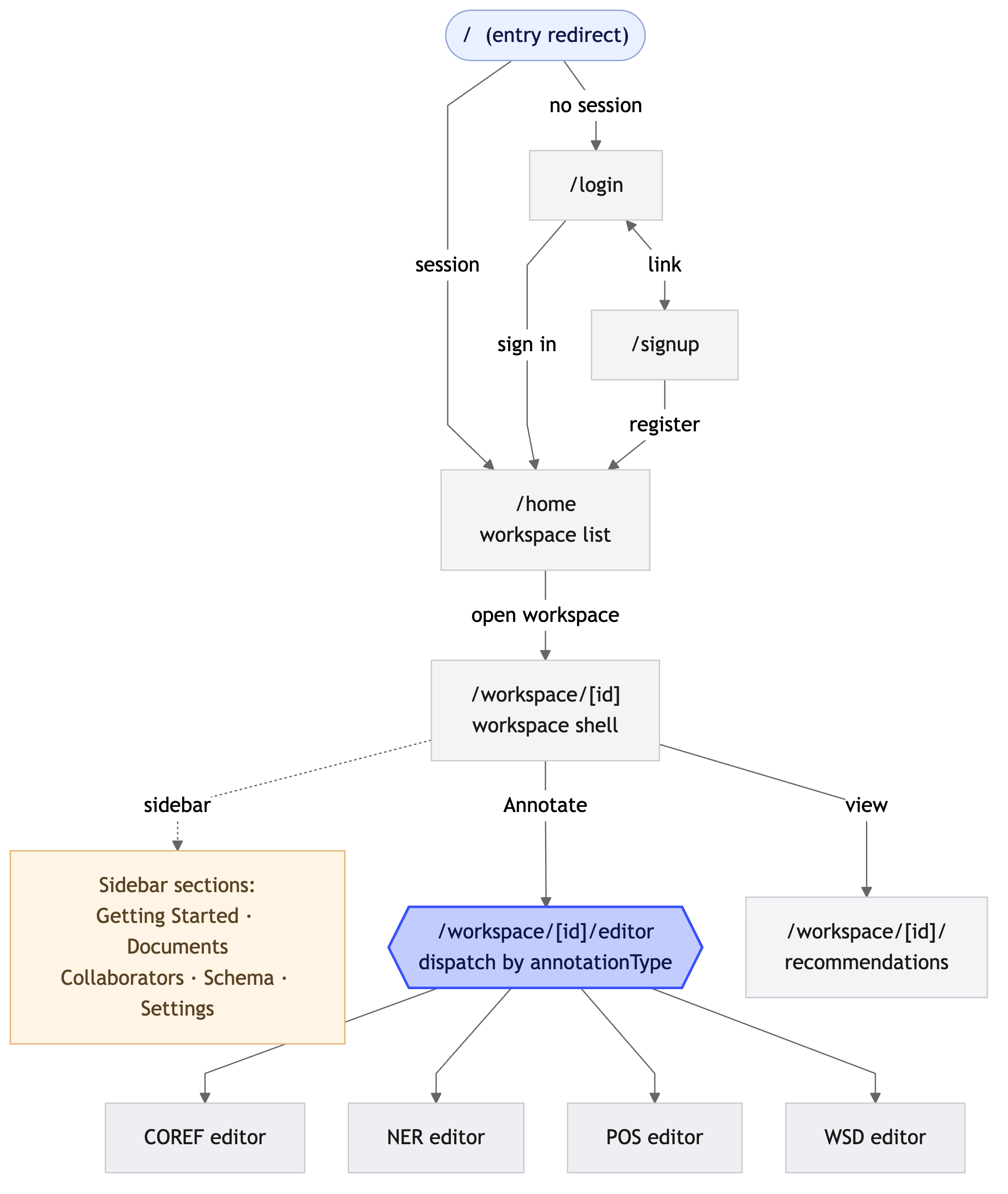
Route map
/login                          sign in
/signup                         create an account
/home                           your workspaces
/workspace/[id]                 documents, members, exports for one workspace
/workspace/[id]/editor          the annotation editor (type-specific)
/workspace/[id]/recommendations suggested annotations to review
The root / redirects to /login; every route under /home and
/workspace requires a signed-in session.
Looking for a non-technical walkthrough?
The User Guide covers the same screens with annotated screenshots, written for annotators rather than developers.
Getting in
- Sign up with email and password (validated client- and server-side).
- Log in — on success the app stores the session in HTTP-only cookies
and redirects to
/home. - Sessions refresh automatically in the background; users stay signed in until the refresh token expires or they log out.
Home
Lists every workspace the user owns or belongs to, with its annotation type badge. From here users create a new workspace (name + annotation type: Coreference, NER, POS, or WSD) or open an existing one.
Workspace
The workspace page is the management hub:
- Documents — upload TXT or CoNLL-2012 files (up to 25 MB), see tokenization status, open a document in the editor, delete documents.
- Members — invite/remove members and change roles (owner-gated).
- Export — download the workspace's annotations as CoNLL-2012 or CSV via the export dialog.
- Recommendations — review automatic suggestions; accept applies the annotation, dismiss hides it permanently for that user.
The editors
Opening a document routes to the editor matching the workspace type. All editors share the same shell: a paginated token view that lazy-loads long documents, a document switcher, a help panel with keyboard shortcuts, and automatic session persistence (reopening a document restores your position).
- Coreference editor — select token spans to create mentions; group mentions into colour-coded clusters; merge clusters; inspect and delete existing annotations.
- NER editor — select spans and assign entity labels; labelled spans are highlighted inline.
- POS editor — tag tokens with parts of speech from the workspace's tag set (including custom tags); optimised for fast keyboard-driven tagging token by token.
- WSD editor — for each ambiguous token, pick the correct sense from the sense inventory; includes a sense-inventory browser.
Where multiple annotators work on the same document, disagreement indicators show tokens whose annotations differ between users.
Notifications
A bell dropdown in the header shows in-app notifications (document tokenized, member added, etc.), polled periodically and markable as read.
Internationalisation note
The platform is script-agnostic: tokenization and all editors handle non-Latin scripts (the original deployment annotates Assamese corpora alongside English).